Keep Awake modes
Start Keep Awake from the popover, Power, a profile, the terminal, an AI client or your iPhone. Pick a duration from 15 minutes to 12 hours, or until you turn it off. Changing the duration during a session applies it from that moment.
| Display on | Display may sleep | Lid closed | |
|---|---|---|---|
| Display | Stays lit | Sleeps on its timer | Sleeps on its timer; the built-in one is off while shut |
| Closing the lid | Mac sleeps¹ | Mac sleeps¹ | Mac keeps running |
| Screen locks² | When you lock it or close the lid | When the display sleeps | When the display sleeps or the lid closes |
| Apple menu › Sleep | Works | Works | Ignored until the session ends |
| Battery use | Highest | Low | Low, but a closed bag traps heat |
| Setup | None | None | Power helper, approved once |
| Same as | caffeinate -d |
caffeinate -i |
caffeinate -i + pmset disablesleep 1 |
¹ Unless the Mac is in clamshell mode with an external display and power connected.
² Only if Lock Screen settings ask for a password after the display turns off.
All three work on battery or adapter and end on their timer even if Battistics is suspended.
Profiles
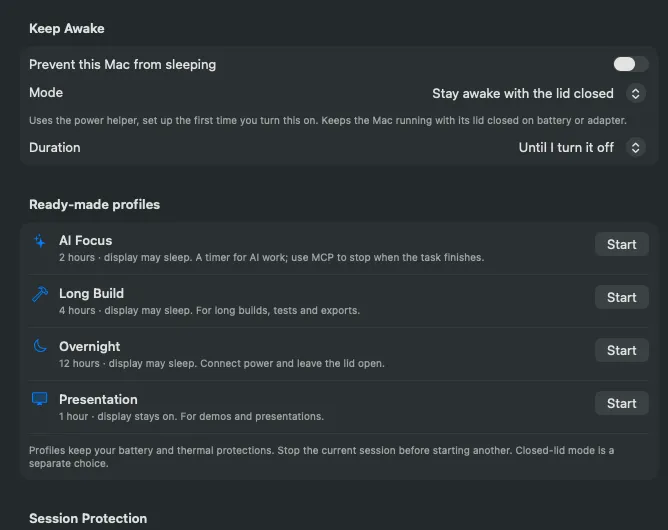
Section titled “Profiles”| Profile | Duration | Display |
|---|---|---|
| AI Focus | 2 hours | May sleep |
| Long Build | 4 hours | May sleep |
| Overnight | 12 hours | May sleep |
| Presentation | 1 hour | Stays on |
Profiles start a timed session, change no settings and never use closed-lid mode. They do not replace a session that is already running.